


Imagine this
Hello, data lovers! Let’s start with a very real dog owner story 🐶. You know the moment: the food bag is almost empty, your dog is already looking at you like this is somehow your fault, so you go online and order a new one. Somewhere behind the website, a system records your order, updates the stock and keeps track of the payment. A few months later, the same company may want to analyze thousands of similar orders to understand buying patterns or forecast demand. Same data, completely different job.
So why not just keep everything in one big database?
Because each use case puts different constraints on storage. Operational systems need the current state immediately. Other components may consolidate data coming from several systems or keep shared entities such as customers and products consistent. Analytics, meanwhile, needs history without putting unnecessary pressure on production systems.
So today, we will go through the main storage building blocks companies use, one by one: operational storage first, then Operational Data Stores (ODS) and Master Data Management (MDM), and finally the main analytical storage layers.
Here is the map of the building blocks we will cover today 👇
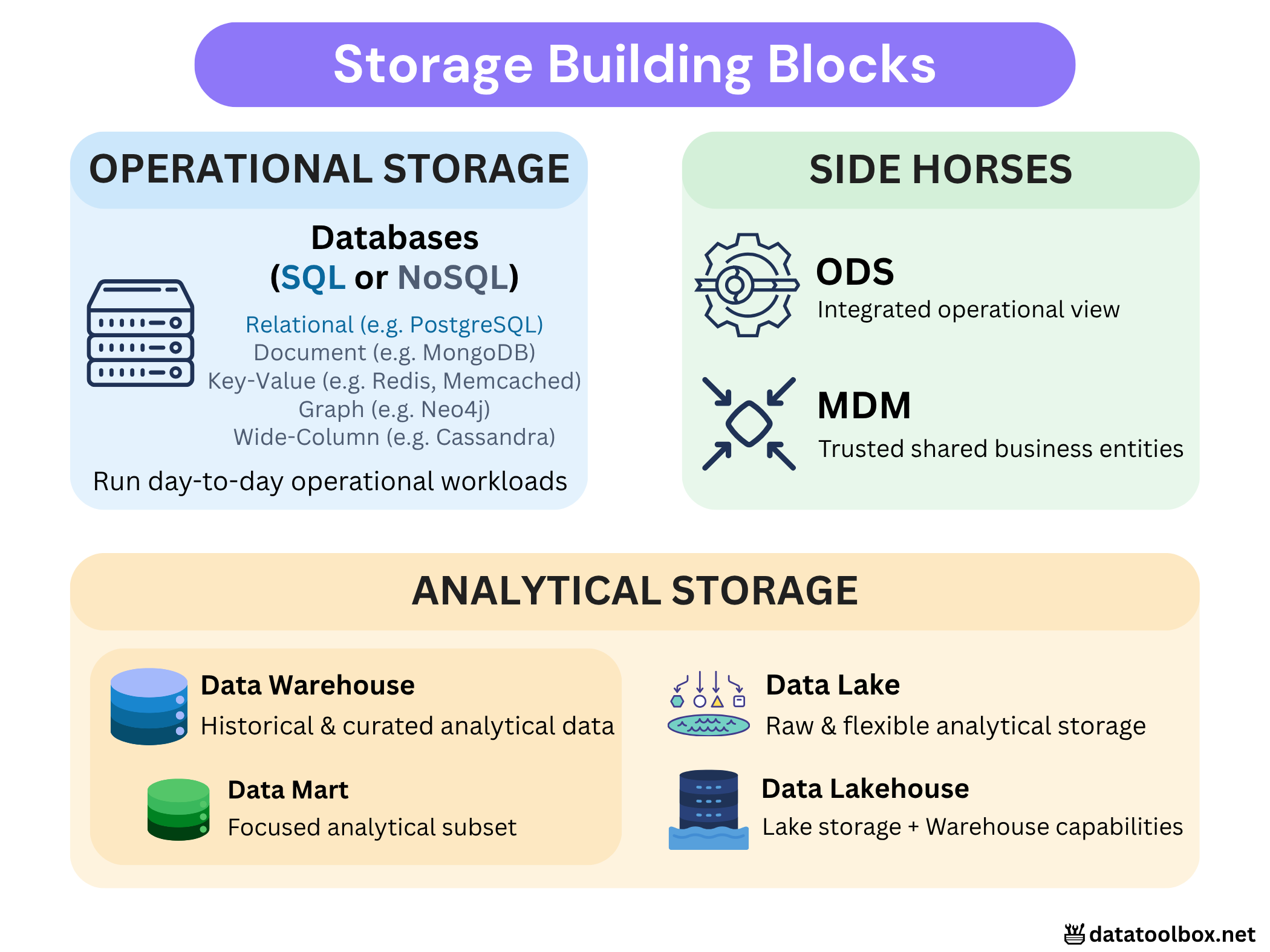
Operational Storage
Let’s start with the systems that actually keep the business running day to day.
Think about what happens right after you order that bag of dog food 🐶. The order is created, the payment is recorded, and the stock changes. All of that has to happen immediately and reliably, because the application needs the current state of the business to stay correct.
Behind this, databases execute what we call transactions. A transaction is simply a group of operations that should succeed together. For example, when you pay for an order, the payment should not be confirmed if the order was never created or the stock was not updated correctly.
So, to put it simply, operational storage is built to make these small, day-to-day actions happen reliably: frequent reads and writes, low latency, and consistent updates on current business data.
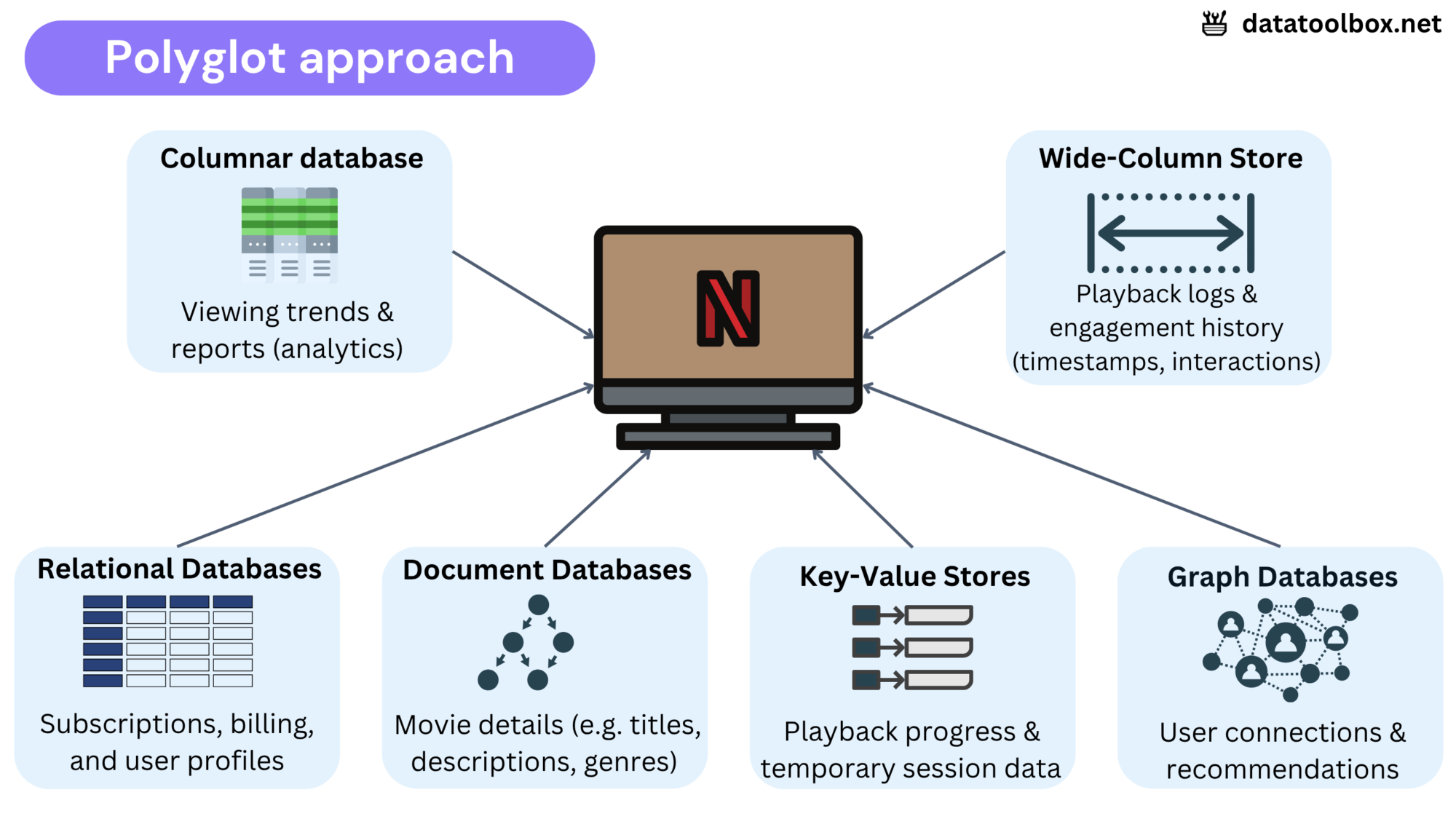
Depending on the workload, operational storage may be relational (e.g. PostgreSQL, Oracle, SQL Server), document based (e.g. MongoDB), key value (e.g. Redis, DynamoDB), graph based (e.g. Neo4j), wide column (e.g. Cassandra), etc. The technology changes, but the role stays the same: store and update the operational state the business needs right now. See here for all the data models and database technologies that exist!
Some terminology – You will often hear transactional database and operational database used almost interchangeably, but they are not exactly the same thing!
- A transactional database (think SQL) is designed to execute transactions reliably when data changes, usually with strong consistency guarantees.
- An operational database (think SQL + NoSQL) is the broader term: any database used by applications to support day-to-day business operations.
Side Horses

Operational systems are good at keeping each application running, but companies quickly run into another problem: the same data is often spread across several systems.
Sometimes, several systems describe the same customer or product differently, and you need to figure out which records actually belong together. Other times, each system has only one piece of the picture, and you need to bring those pieces together into one current operational view.
This is where MDM and ODS come in. Let’s look at both in a bit more detail.
1️⃣ Operational Data Store (ODS)
Use case: A customer wants to buy a red shirt, but stock is spread across several warehouses using different inventory systems. How do we know what is actually available right now?
That is where an Operational Data Store (ODS) comes in. It consolidates current or near-real-time operational data from several source systems into one integrated view, so applications, like your e-shop for example, can access the information they need without querying every source independently. The same consolidated view can also be reused by other downstream systems.
Key characteristics:
- Supports operational use cases by consolidating the current state from multiple source systems into one integrated view.
- Harmonizes different source schemas into a common representation.
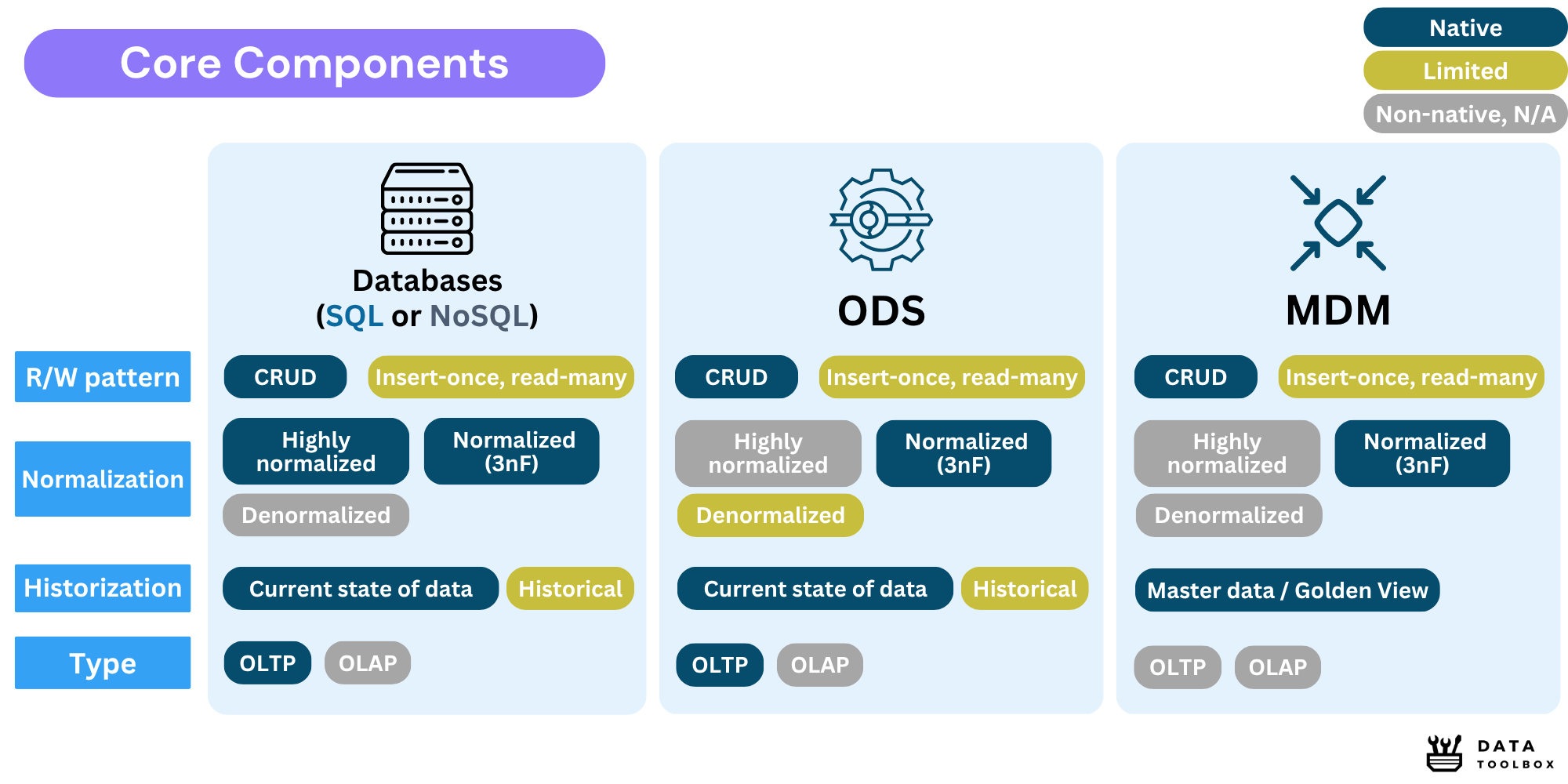
- Usually keeps limited history, focusing mainly on current data.
- Can act as an intermediate layer, providing a clean and consolidated state that can support both operational needs and downstream analytical workloads.
From a data modeling perspective, operational databases often use a highly normalized model to reduce redundancy and keep transactions consistent. An ODS also tends to stay normalized, but may be slightly less normalized when simpler or faster operational queries matter more. Its model is built for integration across systems, rather than around the transaction logic of a single application.
🧠 Mental shortcut: if you know dimensional modeling, an ODS can sometimes feel a bit like consolidating facts from several sources. It is only an analogy, not a strict modeling rule.
2️⃣ Master Data Management (MDM)
Use case: Imagine an insurance company built through years of M&A. Health, Retirement and Life Insurance all have their own systems, and none of them were really designed to talk to each other. So the same customer can exist three times, with three slightly different profiles. Best case, they receive the same marketing email three times. Worst case, one system still contacts a customer who has opted out elsewhere, creating a real compliance problem. Now the question becomes pretty simple: which records actually belong to the same person?
This is where Master Data Management (MDM) comes in. Its job is to reconcile shared business data such as customers, products or suppliers when several systems describe the same thing differently. MDM helps identify which records belong together, resolve conflicting information and keep a trusted version that other systems can reuse. That trusted version is often called the golden record 🥇.
Wait I don’t understand the difference between ODS then?
Fair 😅 Let's keep it very concrete.
- MDM is about the thing itself: a customer 👤, a product 📦, a supplier 🏭. The goal is to make sure the company agrees on what that thing actually is.
- ODS is about the current situation: how many products are in stock, which orders are open, what is happening across systems right now.
So if three systems describe the same customer differently, think MDM. If three systems hold pieces of the current operational picture, think ODS.
Key characteristics:
- Reconciles duplicate or conflicting records coming from different systems.
- Maintains one trusted version of shared business objects such as customers or suppliers.
- Helps create a Single Version of the Truth (SVOT) across siloed sources, especially after mergers, acquisitions or years of disconnected systems.
- Applies specific rules to decide which records match and which information should be trusted when sources disagree.
- Can distribute mastered data to both operational and analytical systems so they reuse the same trusted definitions.
- Requires governance and ownership, because someone still needs to define the rules, choose trusted sources and resolve conflicts.
👉 Data Governance point here! MDM is not just “a virtual storage box”. Someone still has to decide how records are matched, which value wins when two systems disagree, and who is responsible for that data. This is where terms like matching, survivorship and data ownership come in. So MDM is really a mix of technology and governance. The tool can apply the rules, but people still need to define those rules, decide which sources can be trusted and keep everything consistent over time, it’s not exactly a small deal…
🧠 Mental shortcut: if you know dimensional modeling, MDM can sometimes feel a bit like consolidating dimensions across several sources. It is only an analogy, not a strict modeling rule.
Summary
Analytical Storage
So far, we have mostly looked at systems that help the business run right now. But at some point, companies want to look backward: What happened last quarter? Which products are growing? Why did sales drop in one region? etc.
This is where analytical storage comes in. Instead of serving thousands of small operational transactions, these systems are designed to scan, aggregate and compare much larger volumes of data for reporting, BI, Data Science and other analytical workloads.
I will keep this part focused on the storage building blocks. If you want to see how Warehouses, Lakes, Lakehouses, Fabric and Mesh fit together as complete architectures, we will go much deeper here.
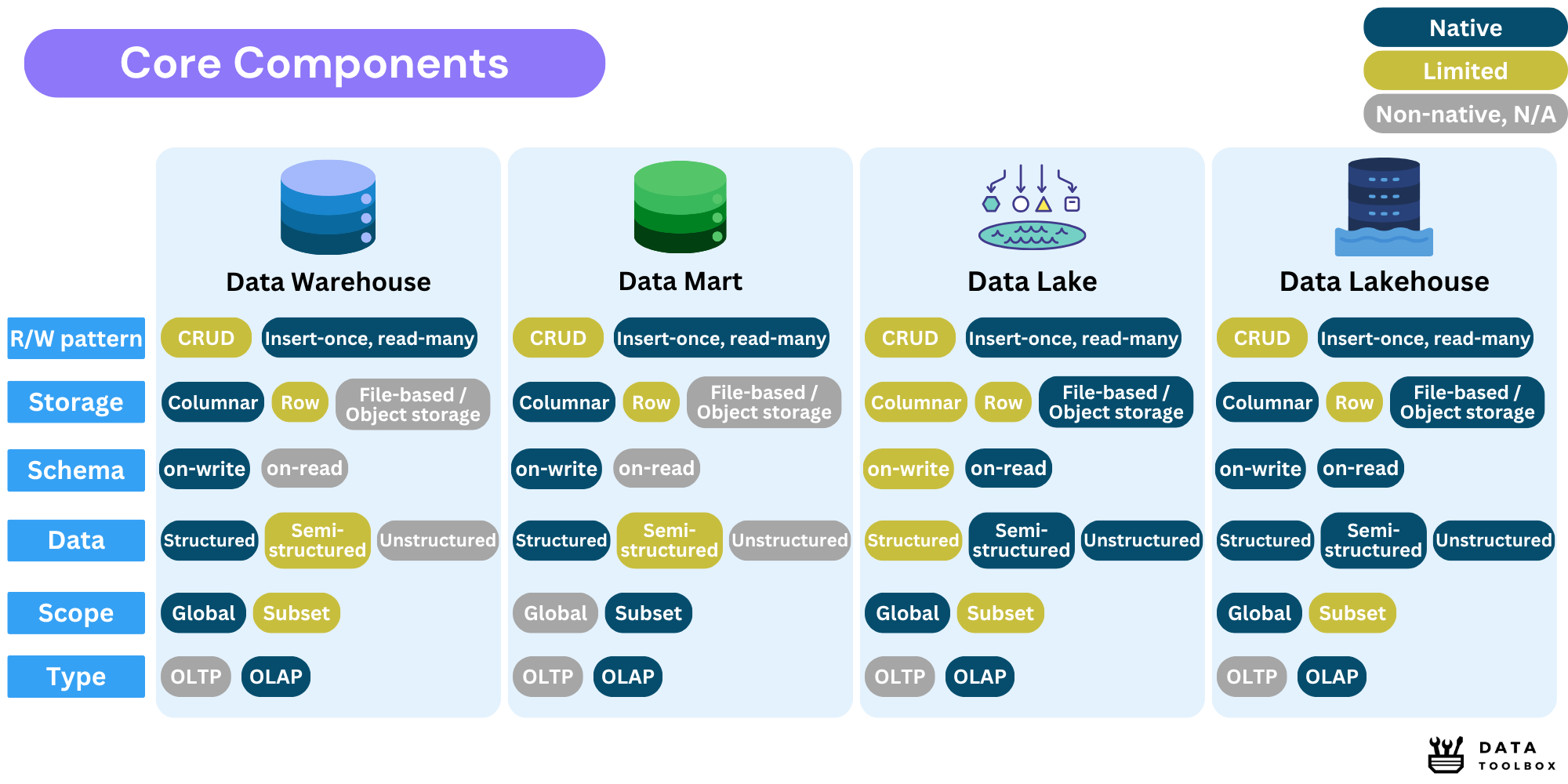
1️⃣ Data Warehouse
Use case: Your retail company has five years of sales coming from stores, the e-shop and several regions. You now want one place where analysts can compare revenue, understand seasonal trends and build trusted dashboards.
That is the classic job of a Data Warehouse (DWH). It brings historical data from different sources into a structured analytical model, usually cleaned and integrated before users start querying it.
Warehouses are built around analytical queries rather than individual transactions. Instead of asking “What is the current stock for this blue-shirt 👕?“, you are more likely to ask “How did stock levels affect sales across all stores over the last three years?“.
Key characteristics:
- Stores historical and integrated data from multiple sources.
- Usually works with structured data organized for analytics.
- Often relies on columnar storage for efficient analytical queries.
- Typically serves broad and organization-wide analytical needs.
- Supports Analytics, BI, ML, and Data Science workloads.
- Follows mainly an OLAP usage pattern.
Technologies: Snowflake, Amazon Redshift, Google BigQuery, Azure Synapse.
2️⃣ Data Mart
Use case: Your Data Warehouse has grown to hundreds of tables covering the whole company. Now imagine being a Finance analyst who only needs revenue, expenses and budgets 😅. Instead of digging through everything, a Data Mart gives you a smaller analytical view focused on your own domain.
That smaller analytical view is what we usually call a Data Mart. It focuses on a specific business domain, department or analytical scope rather than exposing the full analytical environment.
Key characteristics:
- Covers a specific domain or business function, such as Finance, Sales or Marketing.
- Contains a smaller and more focused analytical dataset than a company-wide platform.
- Usually keeps the same OLAP-oriented structure as the analytical system behind it.
- Makes reporting easier by exposing only the data relevant to a particular audience.
3️⃣ Data Lake
Use case: A hospital collects medical images and IoT data from connected devices. These are very different types of data, and you can’t exactly fit an MRI scan into a relational table 😅. A Data Lake gives the hospital one flexible place to store all these different types of data.
A Data Lake gives you a much more flexible place to store that data. Instead of forcing everything into a predefined relational model before it lands, the Lake can keep structured, semi-structured and unstructured data in file-based storage and let processing engines interpret it later.
This is where the idea of schema-on-read becomes useful. The data can land first, then different consumers can decide how to interpret and transform it depending on the workload.
Key characteristics:
- Uses file-based storage, commonly object storage, to support raw data ingestion.
- Can keep structured, semi-structured and unstructured data.
- Supports a schema-on-read approach, giving more flexibility when data lands.
- Often stores raw or lightly transformed data before further processing.
- Works well for Data Engineering, Data Science, ML and large-scale analytical workloads.
- Usually follows an OLAP-oriented access pattern rather than serving application transactions directly.
Typical technologies:
- Storage: AWS S3, Azure Data Lake Storage, Google Cloud Storage, HDFS
- Processing: Apache Spark, Flink, Hive
- Formats: Parquet, ORC, Avro
4️⃣ Data Lakehouse
Use case: Your company already has a Data Lake full of files, but analysts are really tired of dealing with messy tables and inconsistent schemas. At the same time, you do not want to move everything into a traditional DWH. You want to keep the flexibility of the Lake, but make it behave a bit more like a proper analytical platform.
That is where a Data Lakehouse comes in. Underneath, the data still usually lives in Data Lake style object storage, but a table and metadata layer is added on top to bring more structure and reliability.
This changes quite a lot in practice. Instead of treating files as loose objects, the Lakehouse lets you manage them more like real tables, with transactions, schema controls and table management. You keep the flexibility of file-based storage, while adding some of the capabilities people usually expect from a Data Warehouse.
Key characteristics:
- Keeps object storage underneath, just like a Data Lake.
- Adds a table and metadata layer on top of files.
- Supports transactions, schema evolution and more reliable updates.
- Can serve BI, Data Engineering, Data Science and ML workloads from the same underlying data.
- Combines the flexibility of a Lake with more warehouse-like capabilities.
Technologies: Delta Lake, Apache Iceberg, Apache Hudi.
Summary
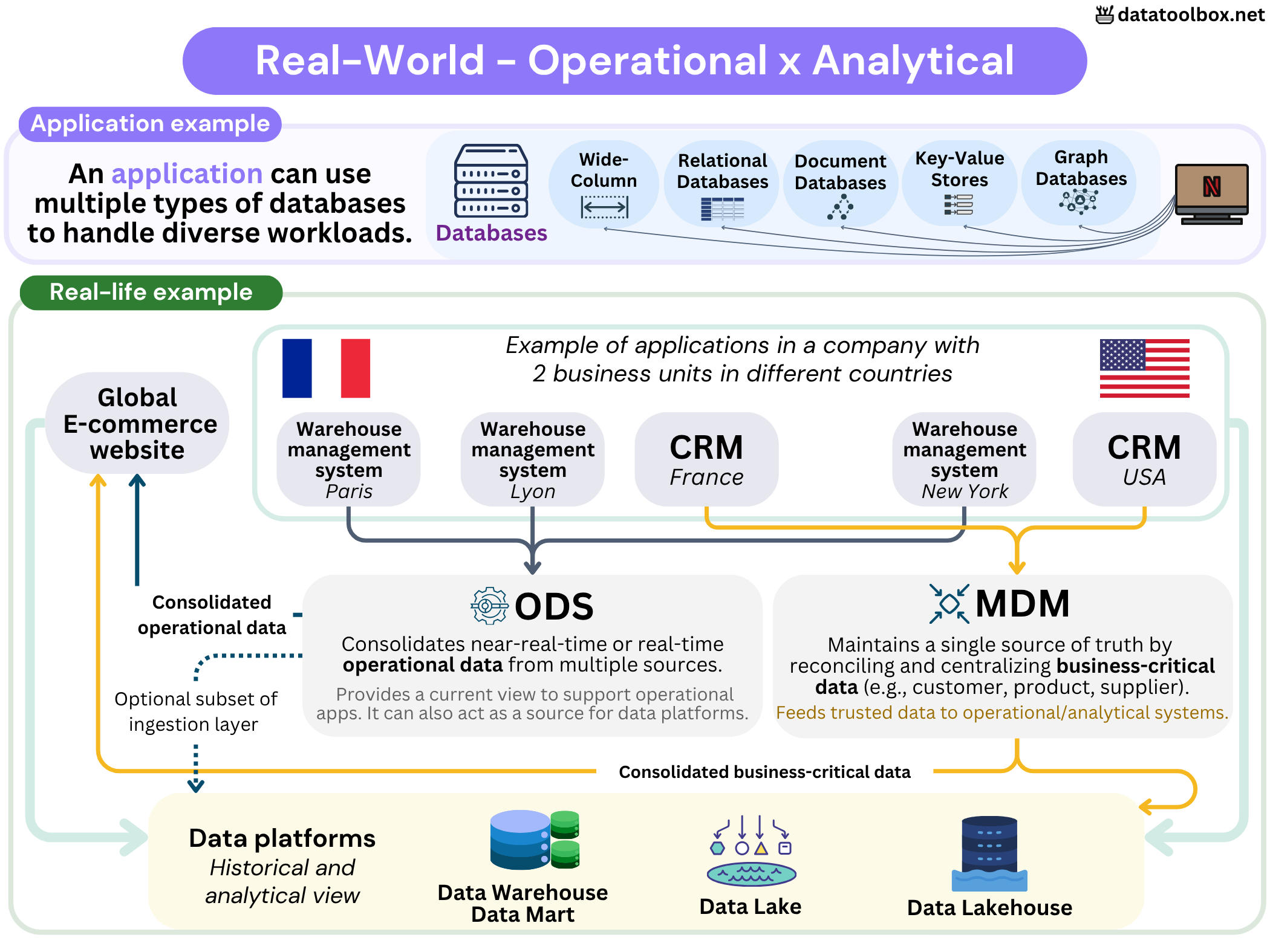
Global overview
Here is a global overview (sorry if it’s a bit dense, I always make this mistake haha 😅) of how analytical and operational systems interact in the real world!
Conclusion

We started with a simple question: why not keep everything in one big database?
Well… now you know why 😅. The database handling your dog food order is not solving the same problem as the platform keeping years of sales history, or the system trying to agree on who the customer actually is. Same company, same data sometimes, but very different jobs.
And that is really what I want you to keep from this article: storage is not just about where data sits, but why it sits there!
👉 Next, we’ll see how these building blocks form complete data architectures: Data Warehouse, Lakehouse, Fabric and Mesh.